I wrote a tool for work that would order VHDL files for compilation. VHDL is one of those languages in which, (annoyingly), everything that file a.vhd depends on must be compiled before a.vhd. After scanning all the source files I extract a dependency list which I stored as a dictionary mapping source file names to the source files they depended on.
I then needed to sort the files so that no file was compiled before any file it depended on.
Now I did google for such a pre-written routine using phrases that included dependency, dependancy :-), depends etc; sort and maybe Python. I got nothing! Eventually I wrote my own which worked very well and I was proud of it.
A couple of months later, whilst reading a newsgroup reply on something or other, someone mentioned a topological sort and so I went and looked that up. If only I knew the term 'topological' I could have found a ready-made solution such as this (which has a good explanation too).
So, "What's in a name"?
Quite a lot actually.
:-) Paddy.
P.S. There is also the tsort Unix utility.
Saturday, October 13, 2007


Thursday, October 11, 2007
Multi-Processing Design Pattern
I am currently off work with a cold, nose dripping onto my keyboard, in front of a pretty old laptop, with no real way to test the following.
For the Wide Finder project, a way to realize the task would be to split the large file, fork sub-process to process each section in parallel then join all the outputs together. Fork/join is Verilog speak. You might also call it mapping file processors onto each file section in parallel then reducing their output.
I have the following bash shell that I need to test on a real machine:
For the Wide Finder project, a way to realize the task would be to split the large file, fork sub-process to process each section in parallel then join all the outputs together. Fork/join is Verilog speak. You might also call it mapping file processors onto each file section in parallel then reducing their output.
I have the following bash shell that I need to test on a real machine:
    #!/bin/bash -x

    ##
    ## Multi-subprocessing of Wide Finder file
    ##

    # Number of sub processes
    #subprocs="$1"
    subprocs="4"
    # Input file
    #infile="$2"
    infile="o10k.ap"

    subprocscript="clv5.sh"
    splitfileprefix=_multi_proc_tmp

    rm -f ${splitfileprefix}*
    size=$(stat -c%s "$infile")
    splitsize=`gawk -v x=$size -v y=$subprocs 'BEGIN{printf\"%i\", (x/y)*1.01}'`

    ## Split
    split --line-bytes=$splitsize "$infile" $splitfileprefix

    for f in ${splitfileprefix}*; do
      $subprocscript $f > $f.sub
    done
    jobs
    wait

    ## Join
    gawk '{x[$2]+=$1}END{for (n in x){print x[n], n}}' ${splitfileprefix}*.sub \
        | sort -n \
        | tail
Wide Finder on the command line
Having followed articles on Wide Finder for the past week, I thought the command line pipe version here, gave fast results straight away but could be improved.
Unfortunately, my main computer at home, my 17" laptop had to go for repairs and so I decided to start using an old Toshiba Portege 7200 that runs XP but has a tiny disk.
The temporary laptop doesn't have the resources to run Cygwin as its unix-on-windows toolset which I am comfortable with so I installed GNU tools for windows fromhere and bash for windows from here then set about re-running and improving the command-line example.
##
## clv1.sh
##
# Original 'command line tools version from
# http://www.dalkescientific.com/writings/diary/archive/2007/10/10/other_wide_finder_implementations.html
time (
grep -E 'GET /ongoing/When/[0-9]{3}x/[0-9]{4}/[0-9]{2}/[0-9]{2}/[^ .]+ ' o1000k.ap \
| gawk '{print $7}' \
| sort \
| uniq -c \
| sort -n \
| tail -10\
)
##
## clv2.sh
##
# include grep functionality in gawk call
time (
gawk --re-interval '/GET \/ongoing\/When\/[0-9]{3}x\/[0-9]{4}\/[0-9]{2}\/[0-9]{2}\/[^ .]+ /{print $7}' o1000k.ap \
| sort \
| uniq -c \
| sort -n \
| tail -10\
)
##
## clv3.sh
##
# uniq -c function moved into gawk
time (
gawk --re-interval '/GET \/ongoing\/When\/[0-9]{3}x\/[0-9]{4}\/[0-9]{2}\/[0-9]{2}\/[^ .]+ /{x[$7]++}END{for (n in x){print x[n], n}}' o1000k.ap \
| sort -n \
| tail -10\
)
##
## clv4.awk
##
/GET \/ongoing\/When\/[0-9]{3}x\/[0-9]{4}\/[0-9]{2}\/[0-9]{2}\/[^ .]+ /{
field2count[$7]++
}
END{
# asort requires no duplicate array values
# Accumulate fields with same count
for (field in field2count){
count = field2count[field]
count2fields[count+0] = count2fields[count] count " " field "\n";
}
# invert and force value type to be numeric
for (count in count2fields){
allfields2count[count2fields[count]] = count+0
}
n = asort(allfields2count,orderedcounts)
for (i=n-10; i<=n; i++){
printf "%s", count2fields[orderedcounts[i]]
}
}
##
## clv4.sh
##
# All but final tail moved into gawk
time (
gawk --re-interval -f clv4.awk o1000k.ap \
| tail \
)
##
## clv5.awk
##
/GET \/ongoing\/When\/[0-9][0-9][0-9]x\/[0-9][0-9][0-9][0-9]\/[0-9][0-9]\/[0-9][0-9]\/[^ .]+ /{
field2count[$7]++
}
END{
# asort requires no duplicate array values
# Accumulate fields with same count
for (field in field2count){
count = field2count[field]
count2fields[count+0] = count2fields[count] count " " field "\n";
}
# invert and force value type to be numeric
for (count in count2fields){
allfields2count[count2fields[count]] = count+0
}
n = asort(allfields2count,orderedcounts)
for (i=n-10; i<=n; i++){
printf "%s", count2fields[orderedcounts[i]]
}
}
##
## clv5.sh
##
# All but final tail moved into gawk
# Change regexp to not use interval expressions
time (
gawk -f clv5.awk o1000k.ap \
| tail \
)
Here are the timings for each version (best of three runs):
clv1.sh 43.3s
clv2.sh 42.1s
clv3.sh 32.5s
clv4.sh 32.7s
clv5.sh 32.5s
Conclusion
The biggest gain came when I used gawk to do the frequency counting in clv3.sh which is the kind of thing I would naturally do and saves a third of the time which would make it the fastest in the table here with a proportionally scaled run time of 0.62seconds
STOP Press!
I decided to compare run times with Frederic Lundh's work. On my initial run I got times above 32s for everything, and with wf-6.py taking over 90s.
The memory mapping seemed to be sticky as a subsequent run gave the following timings:
wf-1-gala.py 30.4s
wf-2.py 8.2s
wf-3.py 9.2s
wf-4.py 9.5s
wf-5.py 10.0s
wf-6.py 6.9s
This is much faster. I decided to test the persistance of the memory mapping of the file by re-running the command-line tests which gave improved results of:
clv1.sh 39.5s
clv2.sh 43.0s
clv3.sh 17.0s
clv4.sh 14.8s
clv5.sh 14.8s
It seems that memory mapping a file decreases run time but on my slow laptop, if the file is to be used once then the time to make the file memory resident may kill any time savings.
If this task was the only thing I had to do in a cron job on the hour, every hour then, despite knowing Python and Perl I would probably go for an awk solution. I would have probably stopped at clv3.sh.
Tuesday, October 02, 2007
Indenting python for blog comments
Note: Script updated 5 Oct 2007
Normally I use vim to turn my python code into nicely formatted and syntax-coloured examples for my posts, but blog comment fields can swallow leading spaces leaving any posted Python code without indentation.
Most blog comment fields only accept a small set of HTML tags (if any), so I cannot use the vim output.
I have written blogger.py to turn leading spaces into HTML space characters which seems to work on blogger and wordpress.
Here is the code:
'''
blogspace.py
Turns leading spaces into HTML   tokens which shows
as correct indentation on Blogger comment fields
(and maybe other blogs).
Donald. 'Paddy' McCarthy Sept,Oct 2011
'''
import fileinput, re, cgi
def escape(lineiterator=fileinput.input,
cgi_escape=True, tag_with_pre=True, tag_with_br=False):
output =
if tag_with_pre: output.append('<pre>\n')
for line in lineiterator():
if cgi_escape: line = cgi.escape(line)
line = re.sub(r'^(\s*)\s',
lambda m: ' '*m.end(),
line.rstrip())
output.append(line)
if tag_with_br:
output.append('<br>\n')
else:
output.append('\n')
if tag_with_pre: output.append('</pre>\n')
return ''.join(output)
if __name__ == '__main__':
print escape()
- Paddy.
( Also posted here and here)
Friday, September 28, 2007
I wish Perl6 were out!
And why, pray tell, would a self confessed 'Pythonista' be waiting on Perl6?
I'll tell you. I think that in the search for the language, Perl 6 looks as if it may be simulated annealing at work with the temperature turned up high. From studying Perl 6 and adapting/using what it gets right we might find ways to improve Python whilst keeping Pythons aims.
I'll tell you. I think that in the search for the language, Perl 6 looks as if it may be simulated annealing at work with the temperature turned up high. From studying Perl 6 and adapting/using what it gets right we might find ways to improve Python whilst keeping Pythons aims.
Tuesday, September 18, 2007
An Open Letter to the Blogspot Team
Your editors for creating new posts and especially for creating comments just are not good enough!
As a programmer I have to use external programs to highlight the syntax of code for a new post which is bad, but the list of usable tags in a comment field is so small that I am reduced to writing a program to parse indented code and spit out something that will look merely OK.
Contrast Blogger editing with this which is available on Wikipedia.
Blogger, catch up!
- Paddy.
As a programmer I have to use external programs to highlight the syntax of code for a new post which is bad, but the list of usable tags in a comment field is so small that I am reduced to writing a program to parse indented code and spit out something that will look merely OK.
Contrast Blogger editing with this which is available on Wikipedia.
Blogger, catch up!
- Paddy.
Sunday, September 16, 2007
On assertions and regular expressions
Text editor is to regular expression as
Waveform is to ... assertion
What I mean is that bump in productivity you get when you've learnt to
use regular expressions with vi/vim/sed/awk/perl/grep... on the unix
command line should be matched by an equal jump in productivity if you
use assertions in your digital design flow.
At the moment, the main digital simulation vendors such as Cadence ncsim, and Mentor questasim allow you to embed or attach assertions to designs that are compiled for simulation, and will automatically extract coverage for these assertions.
What is not so widespread, and what needs to be improved, is the use of interpreted assertions at the command lines of waveform browsers/debugging environments to help navigate waveforms (go to the second write after a read of memory in the range ...),; and to help aggregate displayed waveforms for better understanding of what is shown (highlight any overlap of a write on bus1 with a write on bus2).
I'm currently doing a mind experiment on turning assertions on VCD files, into regular expressions on a string.
- Paddy.
Wednesday, August 22, 2007
Duck Typing Explained.
One rule:
Create and debug your function/method with the argument types you have in mind.
Future users might substitute arguments of a different type but compatible method/parameter signatures, for just those methods used on the arguments.
For example: Create an assembler as if it is taking in a file object, and calling readline to get a line then assembling that line, in a loop, for all lines in the file.
To test the assembler you could:
You could instead:
With Python, Duck typing is a doddle. Tutorials state that checking the type of objects should not normally be done. It is standard practice.
In some statically and manifestly typed languages such as C++, objective C and Java, you can it seems get part or all of this behaviour, (by using Templates in C++ for example), but functions/methods have to be explicitly written to support this behaviour from the outset, and the means by which such behaviour is accessed is not the 'normal' way one would write functions/methods if the behaviour were not considered.
Duck typing's power is rarely seen unless normal coding practices allow it to be later applied to method/function calls without having to know up-front of the need.
- Don't check/assert the type of any argument or part of an argument to a method/function
- Make it easy to see what method calls/parameter accesses are made on arguments.
Create and debug your function/method with the argument types you have in mind.
Future users might substitute arguments of a different type but compatible method/parameter signatures, for just those methods used on the arguments.
For example: Create an assembler as if it is taking in a file object, and calling readline to get a line then assembling that line, in a loop, for all lines in the file.
To test the assembler you could:
- Generate pseudo-random assembler statements.
- Write them to a tmp file
- Close the file.
- Reopen the file for reading.
- And pass the file object to the assembler function.
You could instead:
- Add a readline method to the pseudo-random assembler generator.
- And pass this object to the unchanged assembler function.
With Python, Duck typing is a doddle. Tutorials state that checking the type of objects should not normally be done. It is standard practice.
In some statically and manifestly typed languages such as C++, objective C and Java, you can it seems get part or all of this behaviour, (by using Templates in C++ for example), but functions/methods have to be explicitly written to support this behaviour from the outset, and the means by which such behaviour is accessed is not the 'normal' way one would write functions/methods if the behaviour were not considered.
Duck typing's power is rarely seen unless normal coding practices allow it to be later applied to method/function calls without having to know up-front of the need.
Saturday, July 21, 2007
Python makes simple solutions.
The title is a slogan I thought of to counter those who say Python is simple. My slogan emphasises that :
- Python solves problems.
- Those solutions are simple to understand.
- The code produced is simple to maintain.
Wednesday, July 11, 2007
I've been Crunched!
There is a new crunchy out. I just downloaded the release, unzipped to a directory, then double-clicked crunchy.py, and Firefox opened a new page of delight. Five minutes of reading and I was able to open this very blog and have all the Python code come alive. On this entry, I was able to re-run the example and have new times printed - in the browser, with just a click of an (added) button!
If I had a new algorithm I could have used the edit window supplied to write and test it as well as save my changes.
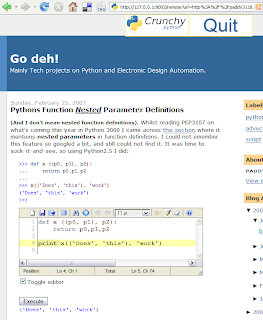
Here is what a crunchy version of this page looks like.
The added editor comes pre-loaded with my example code. The new execute button, when clicked inserts the output of running the code from the editor below it. (click on the image for a larger view).
Neat!
If I had a new algorithm I could have used the edit window supplied to write and test it as well as save my changes.
Here is what a crunchy version of this page looks like.
The added editor comes pre-loaded with my example code. The new execute button, when clicked inserts the output of running the code from the editor below it. (click on the image for a larger view).

Neat!
Subscribe to:
Comments (Atom)

